The LindenTech AI Platform gives a small or mid-sized business one AI assistant that talks to customers on WhatsApp, Instagram, Telegram and in the chat on your website. It answers from your own documents. You set it up by talking to a second assistant called Alt: you say what should change, and you confirm the proposal with one click. The moment you reply to a customer yourself, the AI steps back.
This overview reflects the platform as of 26 October 2026. We checked every feature named here against the platform's source code. The screenshots come from a local test installation filled with invented data for a physiotherapy practice; we never show real customer conversations.
AI Platform at a glance
| Feature | What you get |
|---|---|
| Setup by chatting with Alt | Describe changes in your own words and confirm them with “Yes” |
| One assistant, four channels | WhatsApp, Instagram, Telegram and website chat share the same knowledge |
| Answers from your documents | PDF and text files become the assistant's knowledge base |
| Human handover | Pause with a click, with a command in the messenger, or automatically when you reply |
| Reminders and summaries | Quiet leads get a nudge, long chats shrink to a few points |
| Optimisation with examples | Models and settings are compared on your own questions |
| Control and EU processing | Roles, logs, incidents, data export and an EU endpoint for model calls |
Set it up by talking: Alt builds your assistant
In the Smart view you tell Alt what your assistant should do differently. Alt turns the request into a card, and nothing is saved until you click “Yes”. You never have to hunt for the right form field.
Say the practice starts opening on Saturdays in November. The owner writes: “Please add that we're open on Saturdays from 9 to 1.” Alt shows the instruction before and after. Before she agrees, she asks the “Your assistant” panel on the right, as a patient would, whether the practice is open on Saturdays. The test chat already answers with the proposed change, and no customer sees any of it.
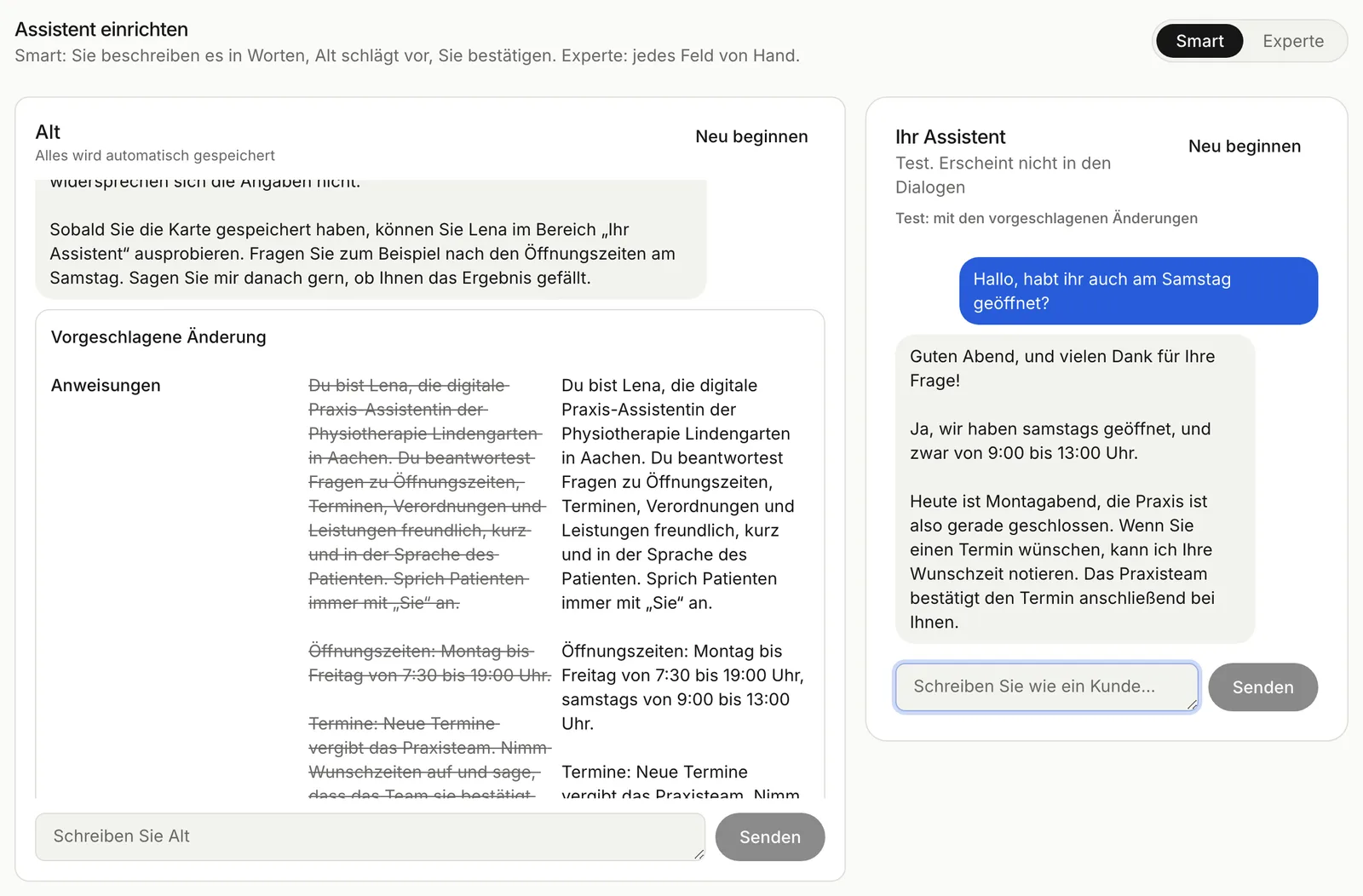
The proposed change and a test before saving. Demo data.
After “Yes” the change is saved. Alt also reminds her to check the opening hours in the uploaded documents, so the two sources don't contradict each other.
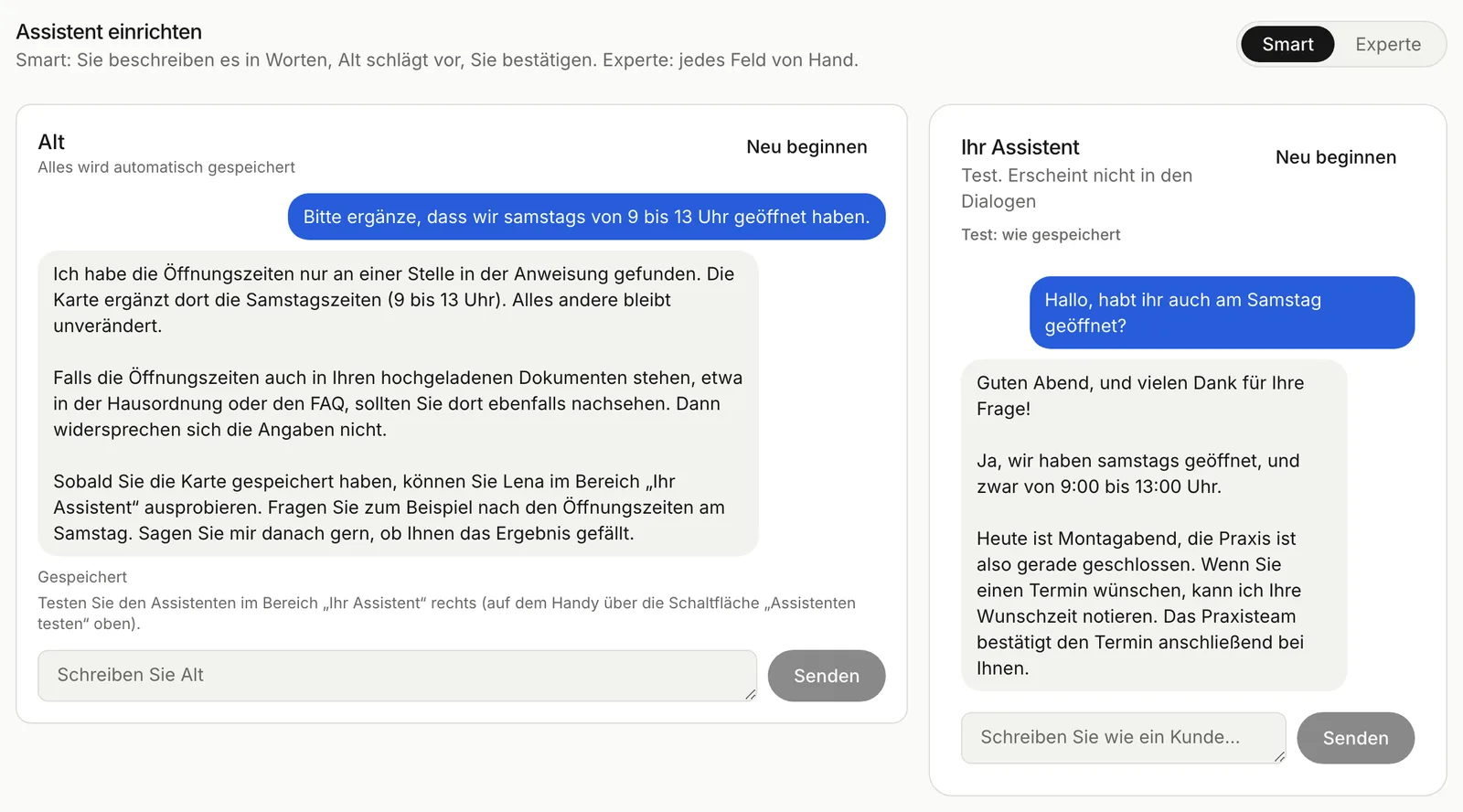
After saving. Demo data.
Alt handles the rest of the setup through the same kind of cards: connecting messengers, the look and greeting of the website chat, uploading and deleting documents, trigger words and the block list. Sensitive values such as a Telegram bot token go into a field on the card, never into the chat. If a colleague changed the same setting in the meantime, the card expires instead of overwriting their work.
If you prefer filling in fields yourself, switch to Expert mode. There you pick the language model from Anthropic, OpenAI, Google, Mistral and other providers and edit the instruction, temperature and answer length. Every saved change is stored as its own version, and you can restore an earlier one.
One assistant for WhatsApp, Instagram, Telegram and your website
Your assistant answers in four channels with the same knowledge and the same rules. You connect Instagram by signing in with Meta, WhatsApp Business through Meta's Embedded Signup or by hand, and Telegram with your bot's token. For WhatsApp the platform also manages the message templates Meta requires outside the 24-hour window. Our article on the WhatsApp Business API covers what Meta asks for.
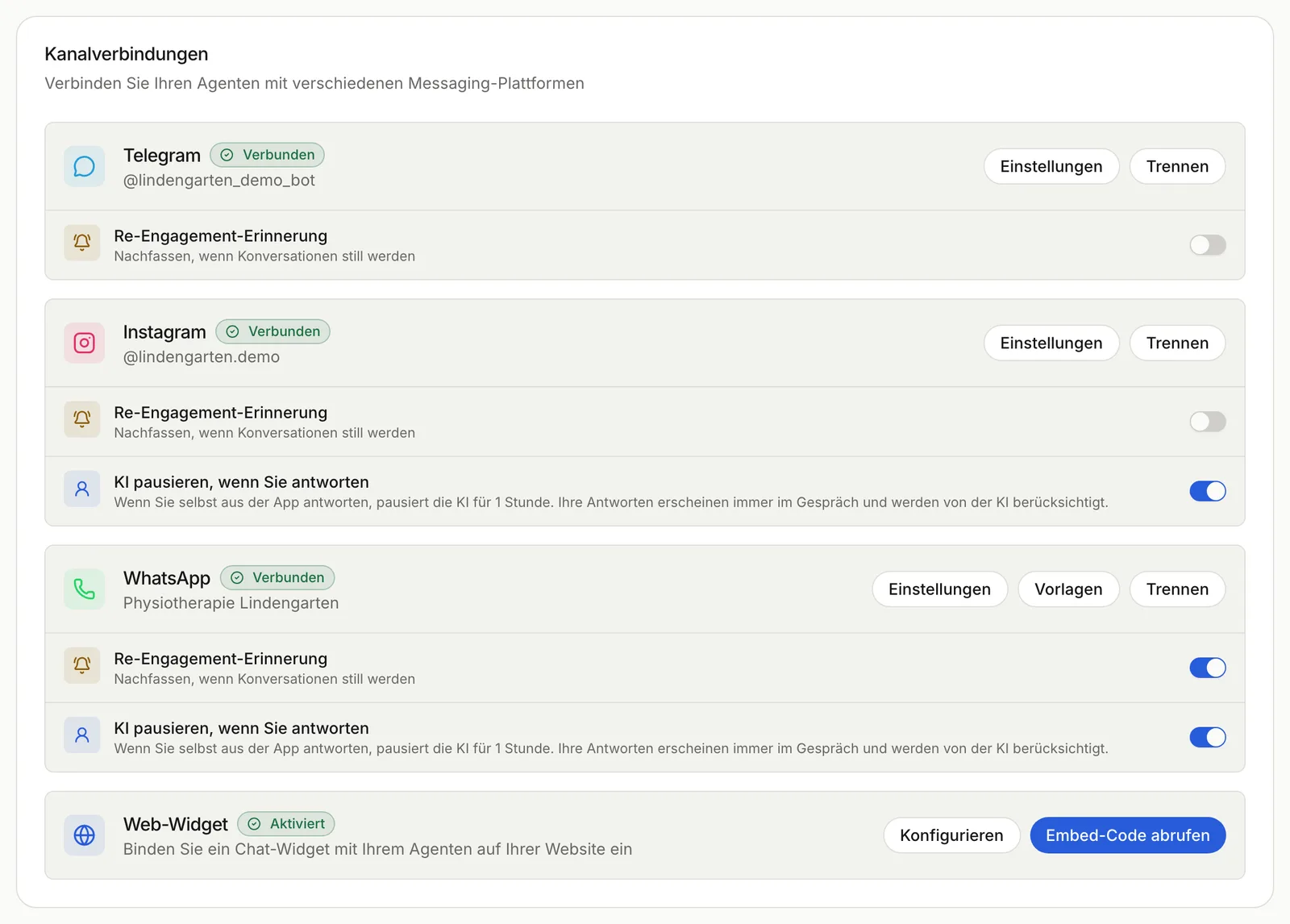
All channels of one assistant on one page. Demo data.
You add the website chat with one line of code. You choose colours, position, size, title, greeting and language: German, English, Russian or automatic from the browser. You also list the domains where the chat may appear. A small speech bubble invites visitors to ask after ten seconds and comes back no sooner than 24 hours later, on phones only if you like. The chat in the corner of lindentech.de runs on the same platform.
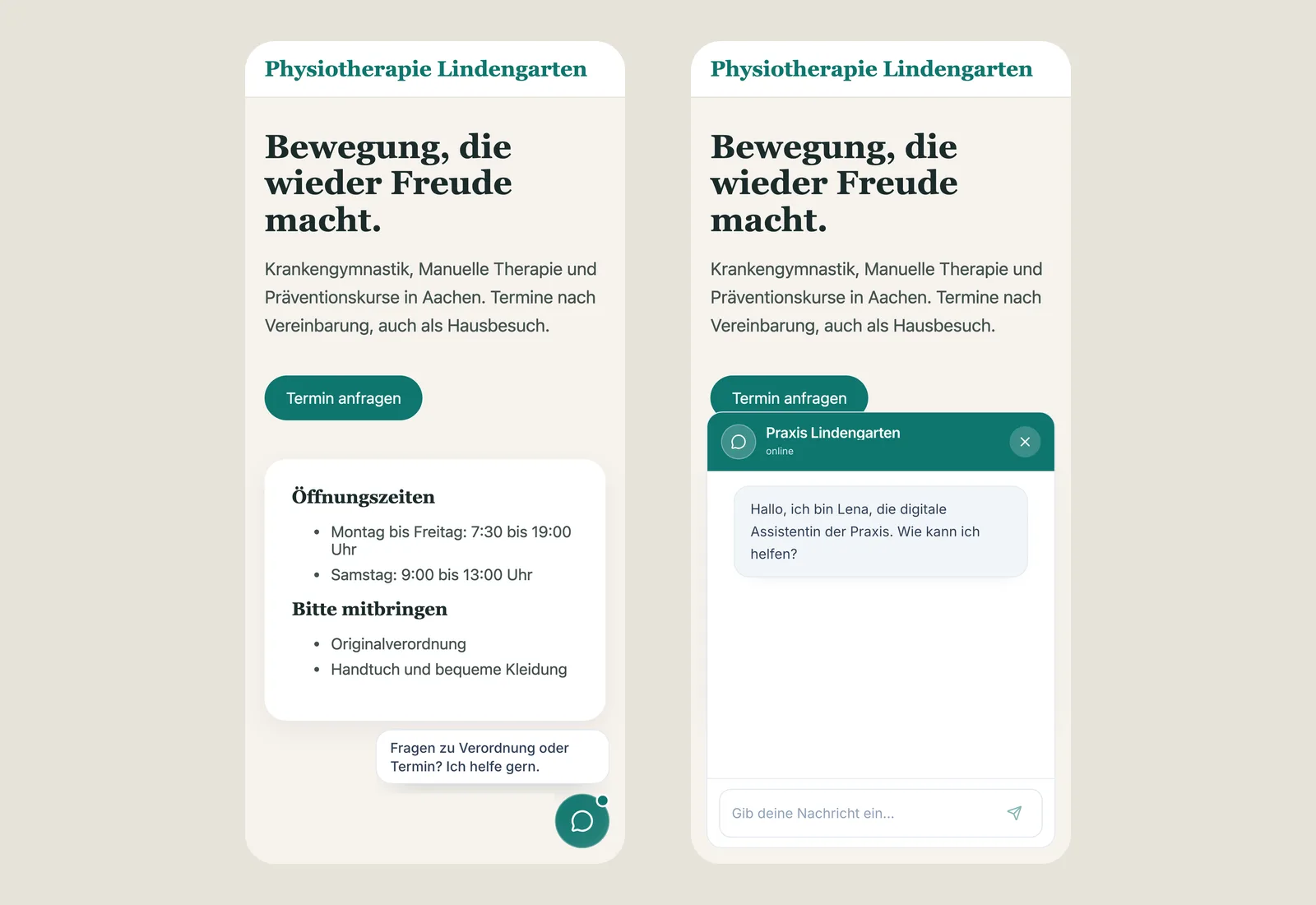
The speech bubble and the open chat on a phone. Demo data.
If you are still choosing a channel, read Telegram bot, WhatsApp or web chat.
Answers from your documents, not from general knowledge
Upload service descriptions, house rules, FAQs or delivery terms as PDF or text files of up to 5 MB each. The platform splits them into passages and, for every customer question, finds the passages that match. The assistant then answers with your facts rather than with whatever a language model knows about your industry in general. RAG explained shows how that search works.
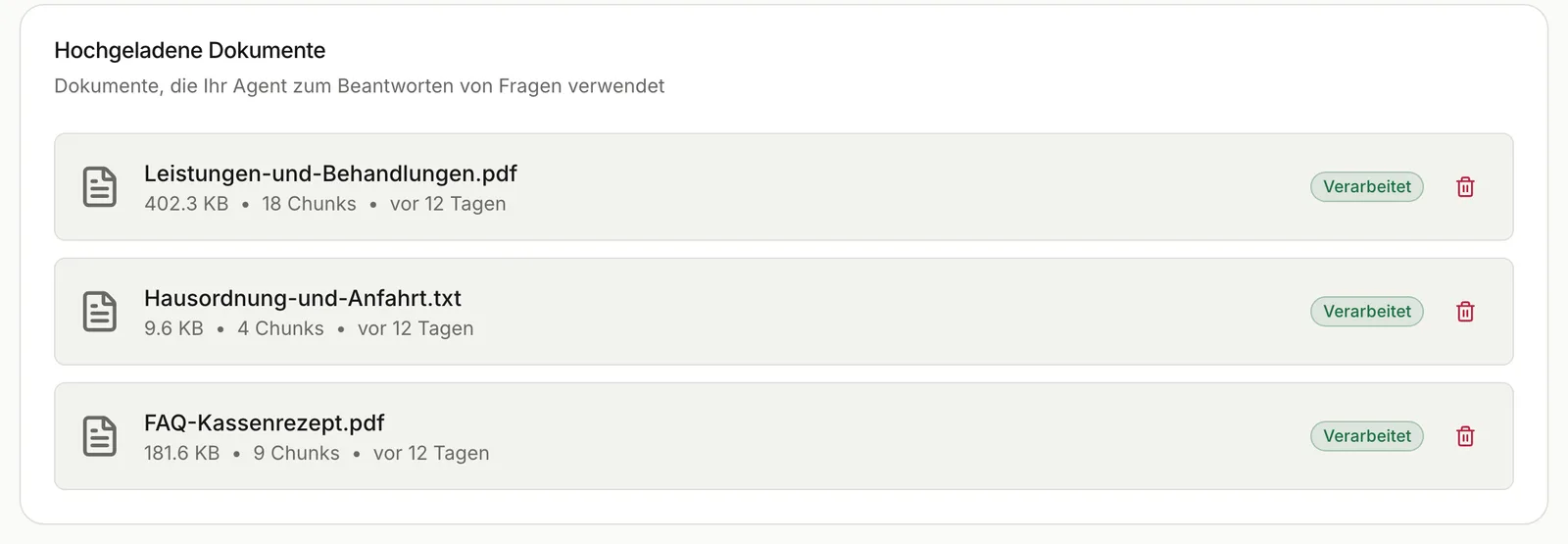
An assistant's knowledge base. Demo data.
A document still needs looking after. When a rule changes, upload the new version and delete the old one. Questions your documents don't cover belong in every test. More safeguards are in our piece on hallucinations in customer service.
You keep the last word: handing over to a person
The AI answers only as long as you want it to, and you have three ways to stop it:
- In the dashboard you pause the AI in a single conversation with one click.
- When you reply yourself from the WhatsApp Business app or from Instagram, the platform spots your message, saves it to the history and keeps the AI quiet in that conversation for one hour.
- On the go you type “agent stop” or “agent start” in the messenger to switch the AI off or on for that conversation.
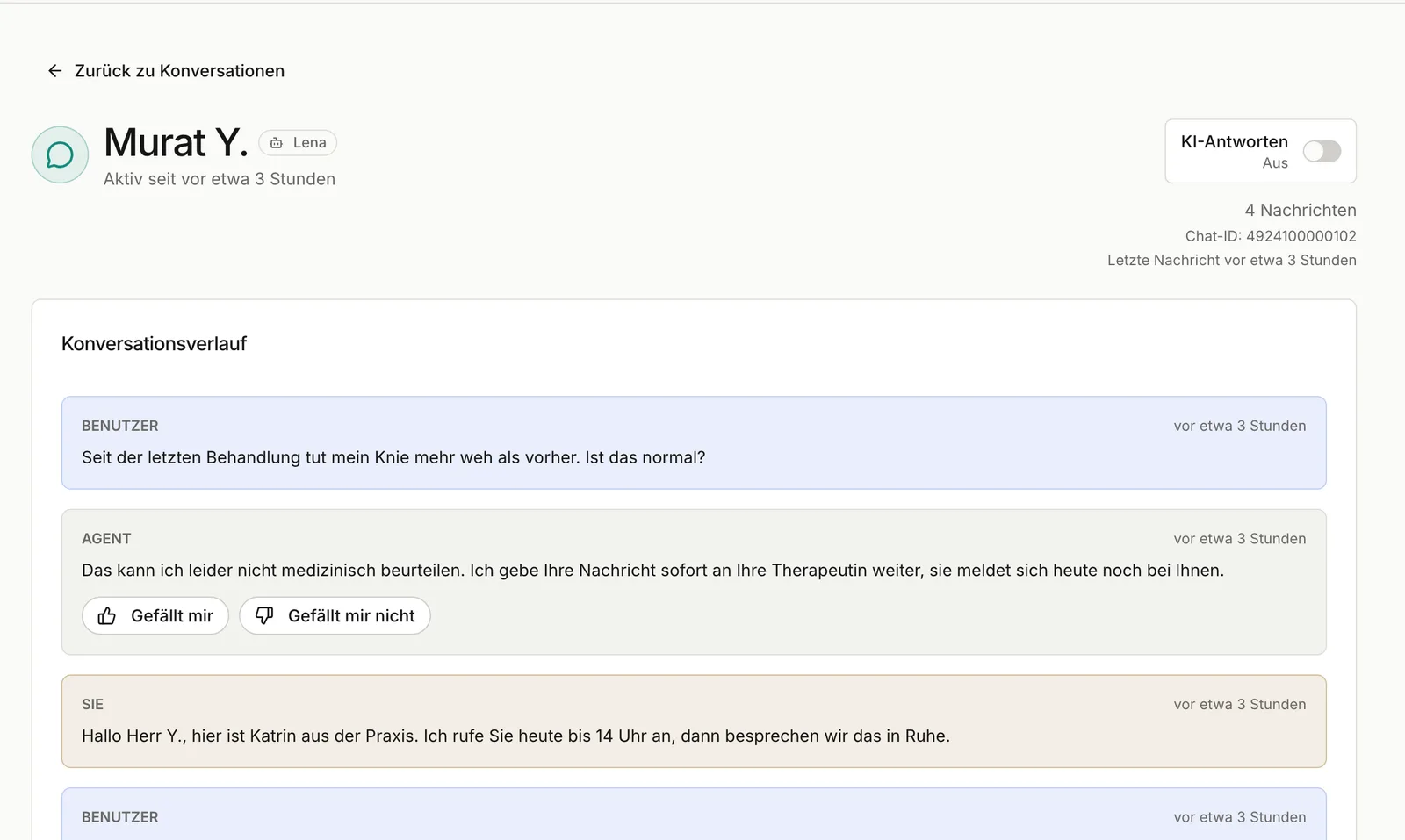
A medical question the practice took over itself. Demo data.
Two more settings decide when the assistant speaks at all. With trigger words it joins a new conversation only after the customer writes a set word, such as the keyword from your Instagram story. The block list excludes Instagram accounts and WhatsApp numbers, for example suppliers or regulars you look after personally. If someone fires off a burst of messages, the assistant asks for a moment instead of answering each one.
No lead slips away: reminders and summaries
When a customer goes quiet in a messenger after asking something, the assistant can follow up once after a little over two days. The exact timing depends on the conversation. The reminder is off by default and you switch it on per channel.
Long chats are summarised in two or three points, in German, English or Russian, twice a day or on demand. Whoever picks up the weekend's conversations on Monday reads the gist instead of fifty messages.
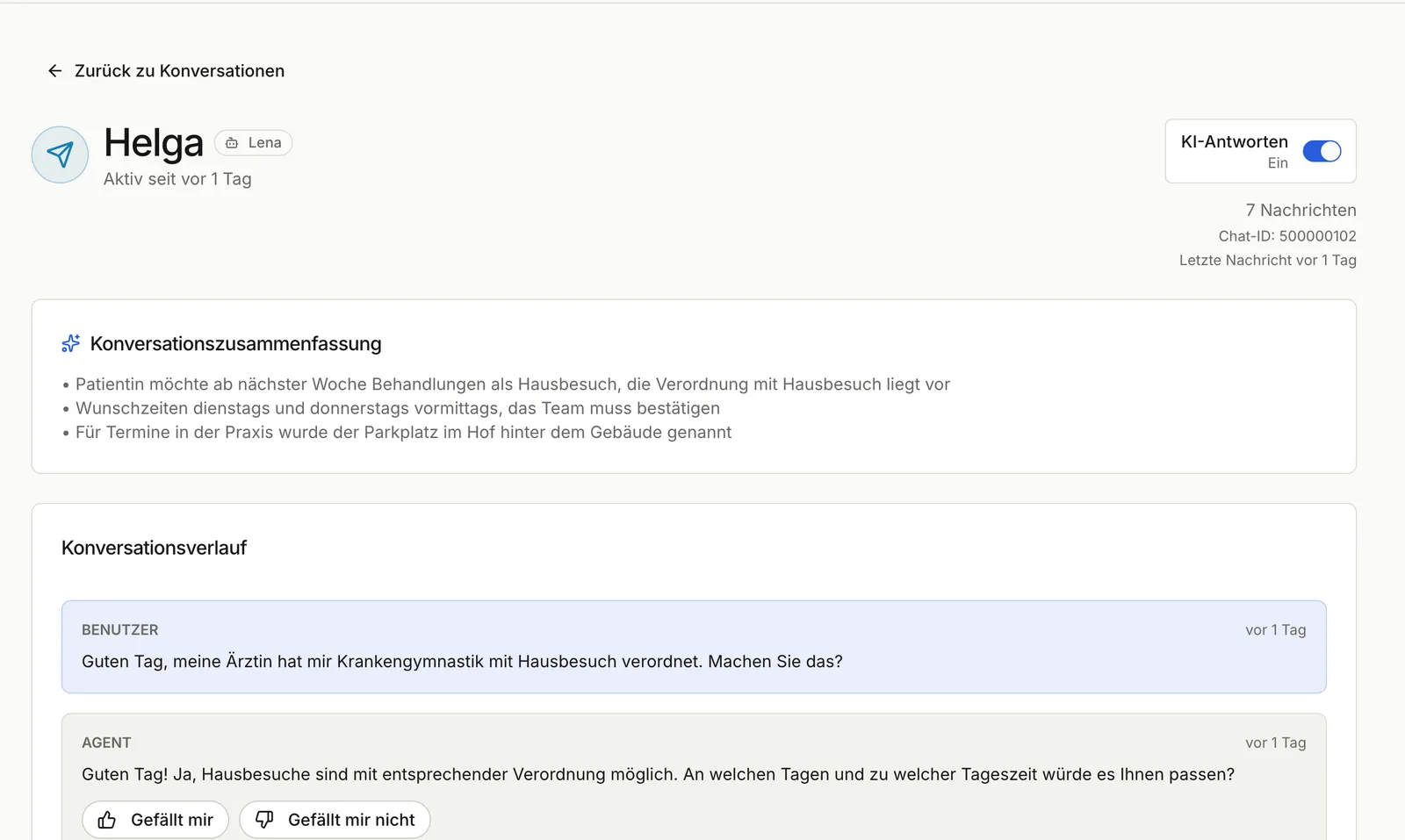
The summary sits above the chat history. Demo data.
Conversations from every channel land in one shared list, and the ones with the AI switched off are marked.
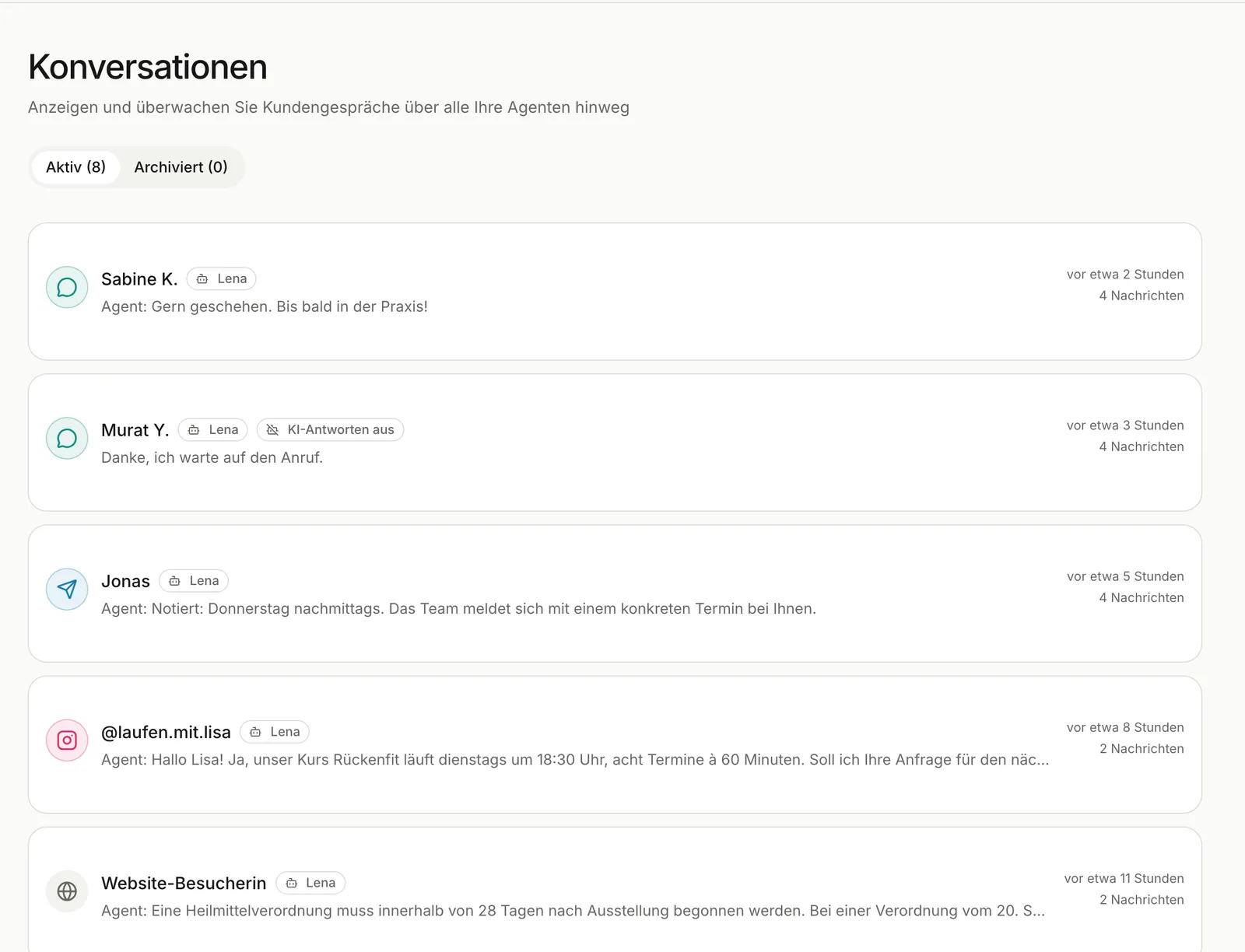
Conversations from every channel in one list. Demo data.
Getting better with your own examples
Under every answer you click “Like” or “Dislike”. Those ratings turn into examples with the answer you expect. Once you have five examples, optimisation compares different models and settings on exactly those questions and puts quality, speed and usage side by side. The comparison runs in the background while your assistant keeps answering customers. You decide whether to adopt the winner.
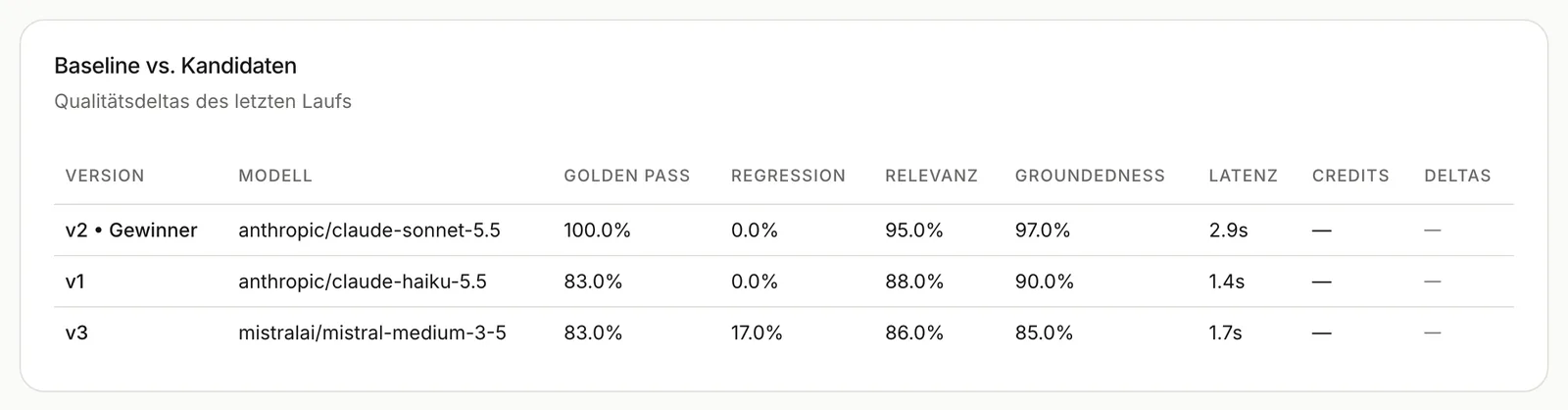
Three models compared on your own examples. Demo data with invented figures.
That way “which model is right for us?” gets answered with your customers' questions, not with vendor benchmarks.
Control, security and EU processing
Teams work with four roles: admin, moderator, operator and read-only. You invite colleagues by link. Channel credentials are stored encrypted.
On request we switch on EU routing for your organisation. Model calls then go through OpenRouter's EU endpoint with no retention at the provider, and only models with EU processing are offered. What else to ask about running AI in the EU is covered in AI in the EU: 7 questions.
The Control Audit Log shows who switched AI replies off or on, changed trigger words or changed the pause for your own replies, and when. Commands sent from the messenger show up there too.
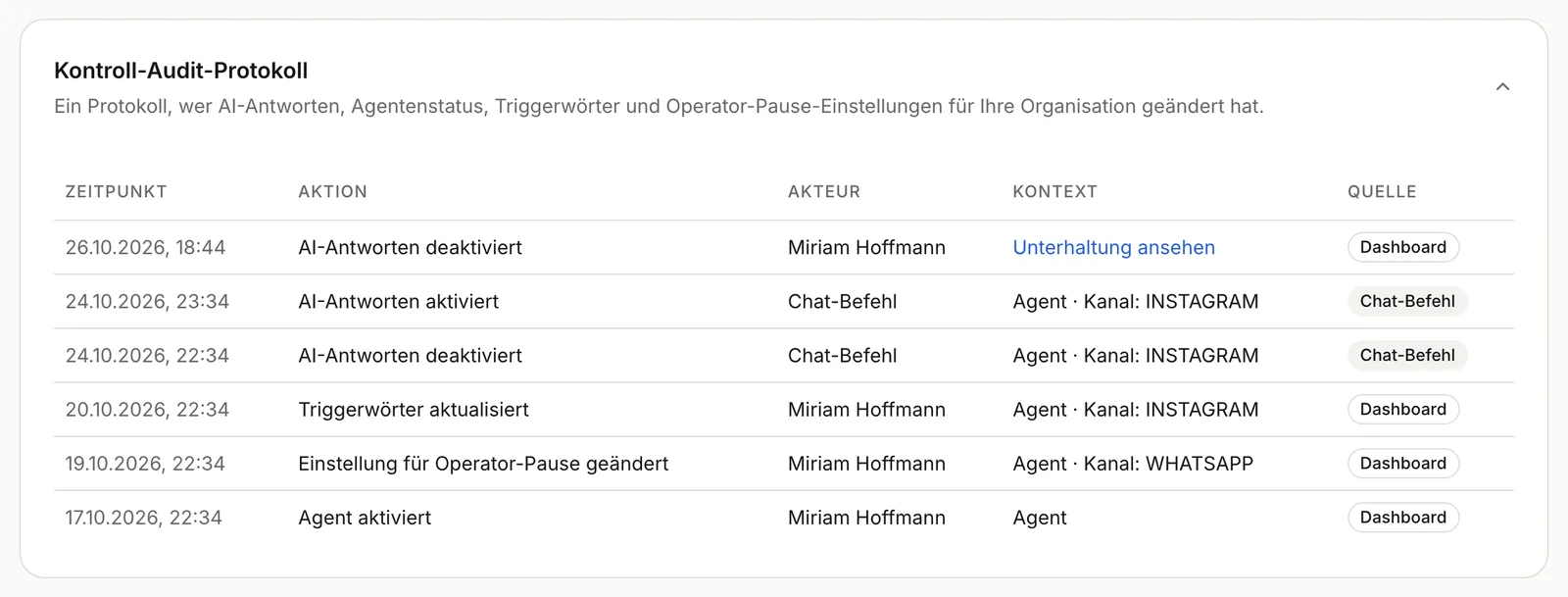
Who switched what, and when. Demo data.
The Agent Health page collects incidents such as a failed answer, a failed delivery or a suspicious input, with a status and an email alert. Your customers never see these error messages. For the GDPR there is data export, account deletion with a 30-day grace period and fixed retention periods.
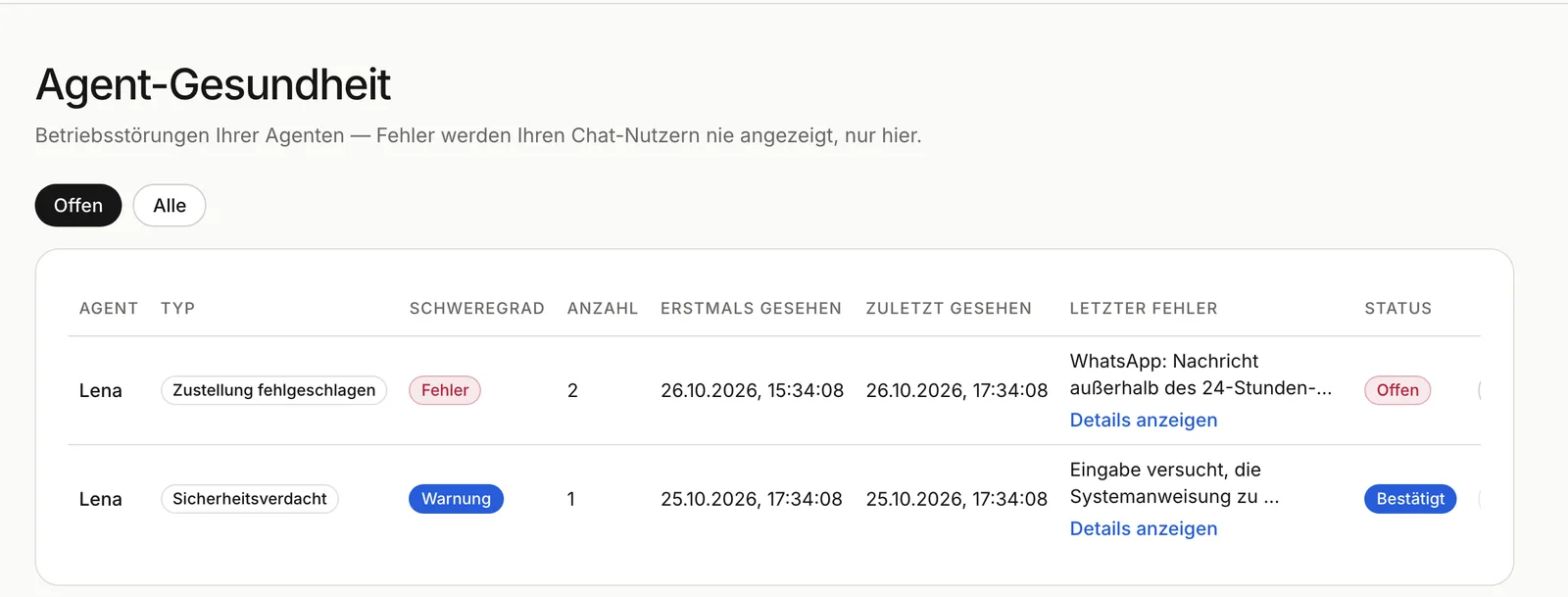
Incidents with severity and status. Demo data.
Use cases: how businesses work with the assistant
These are typical set-ups, not customer stories. The dialogues are invented to illustrate them.
Online shop: delivery and returns on Instagram

A shop owner promotes an autumn sale in her Instagram story. Customers send direct messages about delivery times and returns. With the trigger word “AUTUMN”, the assistant only answers conversations about the sale, using the uploaded delivery and returns terms. Wholesale partners are on the block list and keep getting personal replies.
Customer: AUTUMN, can I send the jumper back if it doesn't fit? Assistant: Yes, within 30 days of delivery. You'll find the return label in your order confirmation.
Practice: taking appointment requests, passing medical questions to the team

Patients message the practice on WhatsApp. The assistant answers questions about opening hours, prescriptions and cancellations and asks for a preferred time when someone wants an appointment. Reception confirms the booking. Following its instruction, the assistant hands medical questions to the team. When reception replies from the WhatsApp Business app, the AI stays quiet in that conversation for an hour.
Patient: I need a physiotherapy appointment, ideally on a Tuesday after 5 pm. Assistant: Of course. I'll pass your request to reception, who will get back to you with a time. Do you already have a prescription?
Service business: preparing new clients

A studio explains its services in the website chat and on Telegram and tells new clients how to prepare for their visit. Anyone who stops replying after a consultation gets a short reminder on Telegram after a little over two days. Each morning the team reads the summaries and calls back the right people.
Branch network: finding the right location

A company with several locations uploads its branch directory. The assistant asks for a landmark and the service needed, then names the right branch with its address and opening hours.
Videos and courses: chapters for YouTube
If you teach through video, connect your YouTube channel. The platform turns a video's official subtitles into chapters with timestamps that you paste into the description.
Where the platform stops
The assistant reads PDF and text files, not spreadsheets, images or audio. It does not book appointments into your calendar, and there is no open API for your own systems. We build those integrations as projects. WhatsApp needs a WhatsApp Business account with Meta, Instagram a professional account. Some features, such as trigger words, the block list, summaries and optimisation, are not included in every plan.
An assistant is only as good as the documents and rules you give it. Our requirements document for an AI chatbot shows how to write them down first and test against them at the end. For a closer look at what happens behind one service request, read Automating service enquiries.
Frequently asked questions
Can I turn the AI chatbot off in WhatsApp when I want to reply myself?
Yes. Just reply from the WhatsApp Business app and the AI stays quiet in that conversation for an hour. “agent stop” switches it off in the conversation, “agent start” switches it back on, and the dashboard does the same with a click.
Do I need to know how to code?
No. You set the assistant up by chatting with Alt or in Expert mode. For the website chat you paste one line of code into your page.
Which languages does the platform support?
The interface and the website chat come in German, English and Russian. Answers are written by the language model, which handles many more languages. You set the ones it should use in the instruction.
How do I test the assistant before customers see it?
In the “Your assistant” panel it answers with your unsaved settings, exactly as it would answer a customer. These test chats don't appear in your conversation list.
Where is the data processed?
With EU routing on, model calls go through OpenRouter's EU endpoint with no retention at the model provider. The platform deletes conversations after fixed periods, and every user can export or delete their data.
Your next step
The platform lives at ai-platform.lindentech.de, and our product page gives an overview. If the assistant should connect to your own systems or you'd rather not set it up yourself, describe the workflow in our AI process check. Bring two or three typical customer questions and the documents your answers come from today.